


10 mins
Internal Linking for SEO and GEO: A Practical 2026 Guide
[TL;DR]
- Internal links help Google discover pages, understand how they relate, and distribute authority across a site.
- Descriptive anchor text gives readers and search engines useful context about the page on the other side of the link.
- Internal linking still matters for AI search, particularly for Google AI Overviews and AI Mode.
- For digital publishers, internal linking also drives revenue, because it keeps readers moving from one article to the next.
What Is Internal Linking?
An internal link is a hyperlink that takes you from one page to another page on the same website. As simple as that sounds, that's basically it.
For example, a link from your homepage to a product page is an internal link, and so is a link from one blog post to another. The opposite is an external link, which is anything pointing to a different domain.
Types of Internal Linking
What makes internal linking interesting is that not all links are doing the same job. There are four kinds, and they work to different degrees.
Navigational Links
Navigational links sit in your header and main menu. They define your site's top-level architecture and usually show up on every page. The most common ones you'll see are links like “Home”, “About”, and “Blog”.

They tell a first-time visitor where the main sections of your site are, and they give crawlers a consistent route into those sections from anywhere on the site.
Contextual Links
Contextual links appear naturally inside the body of your content, within sentences and paragraphs where they actually make sense.
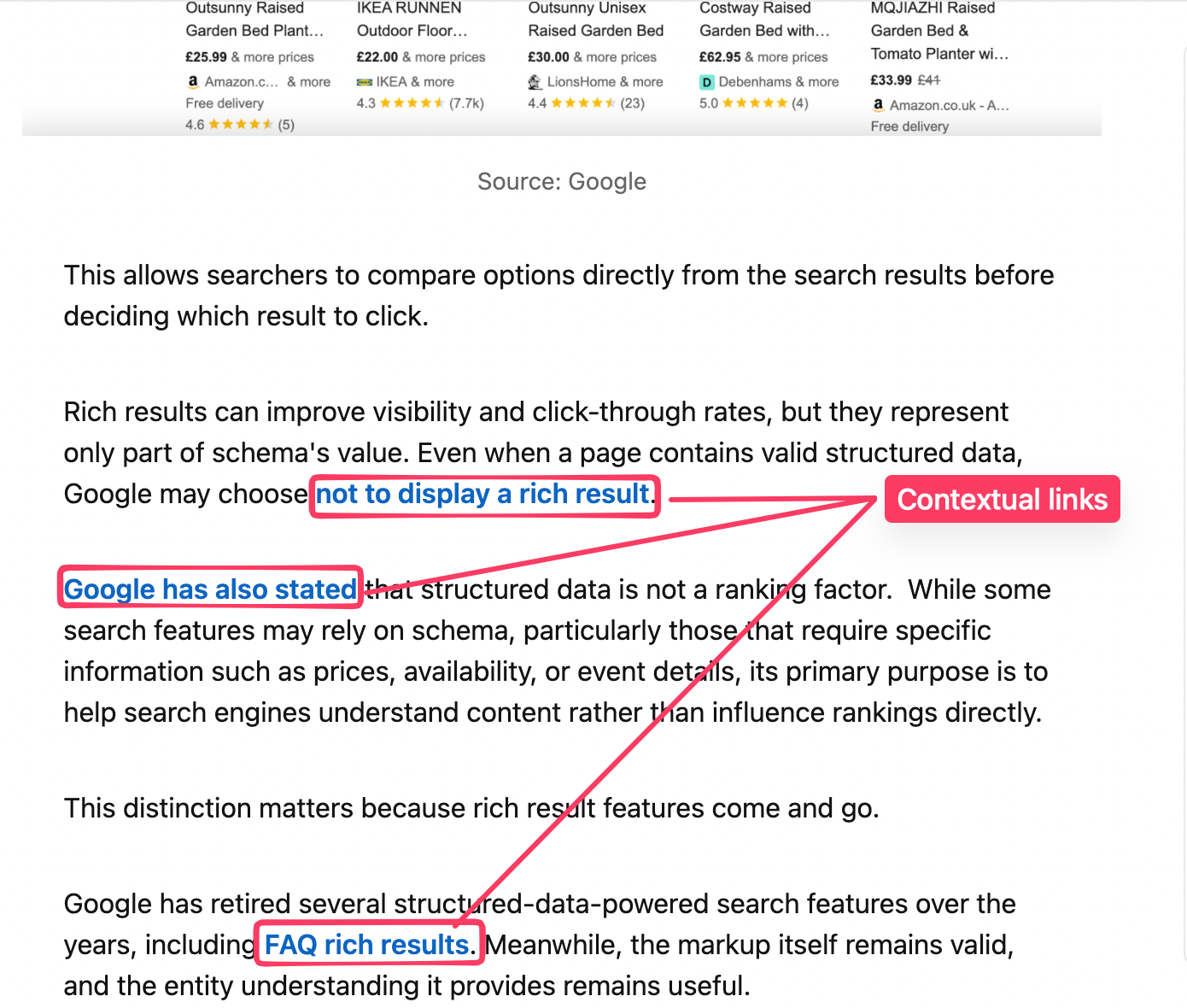
They point readers towards related topics and supporting pages, and in doing so they show search engines how your pages connect to each other.
Footer Links
Footer links handle secondary navigation, that is, things like legal pages, sitemaps, contact details, and company information.
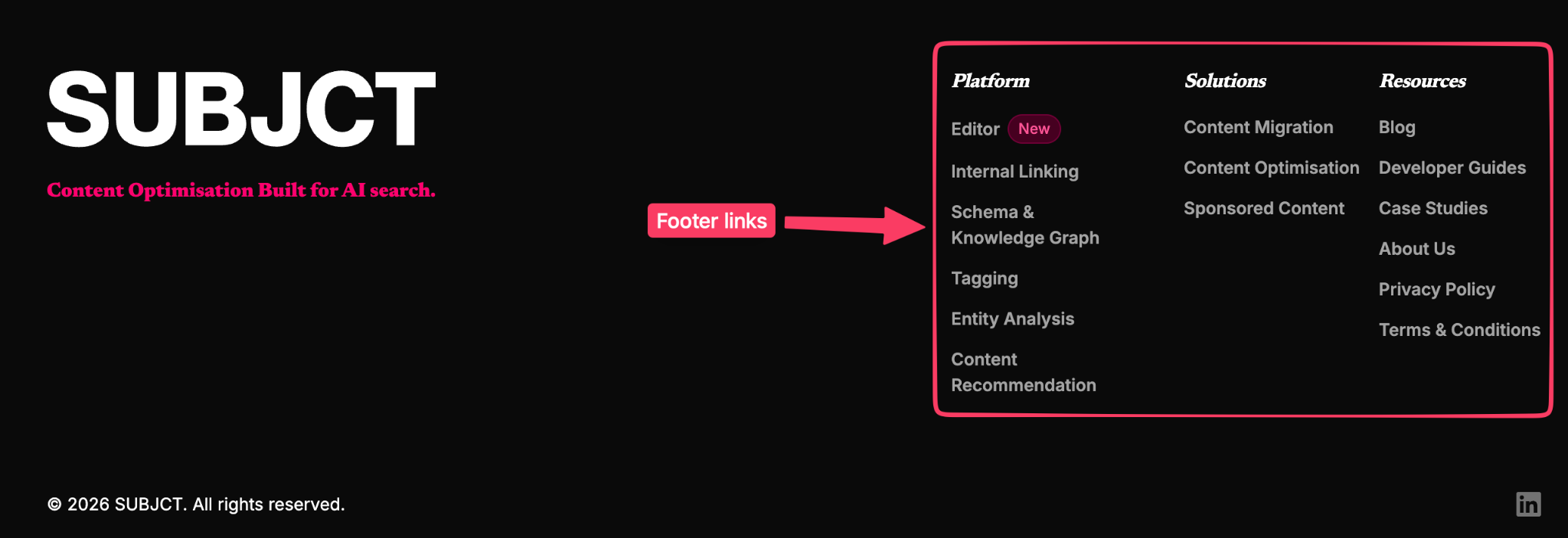
They give crawlers and users a path to pages that do not necessarily belong in the main menu, but their main role is usually navigation rather than contextual relevance.
Sidebar links
Sidebar links are driven by widgets like "related posts" or "popular content". Their value depends on how relevant the recommendations actually are.
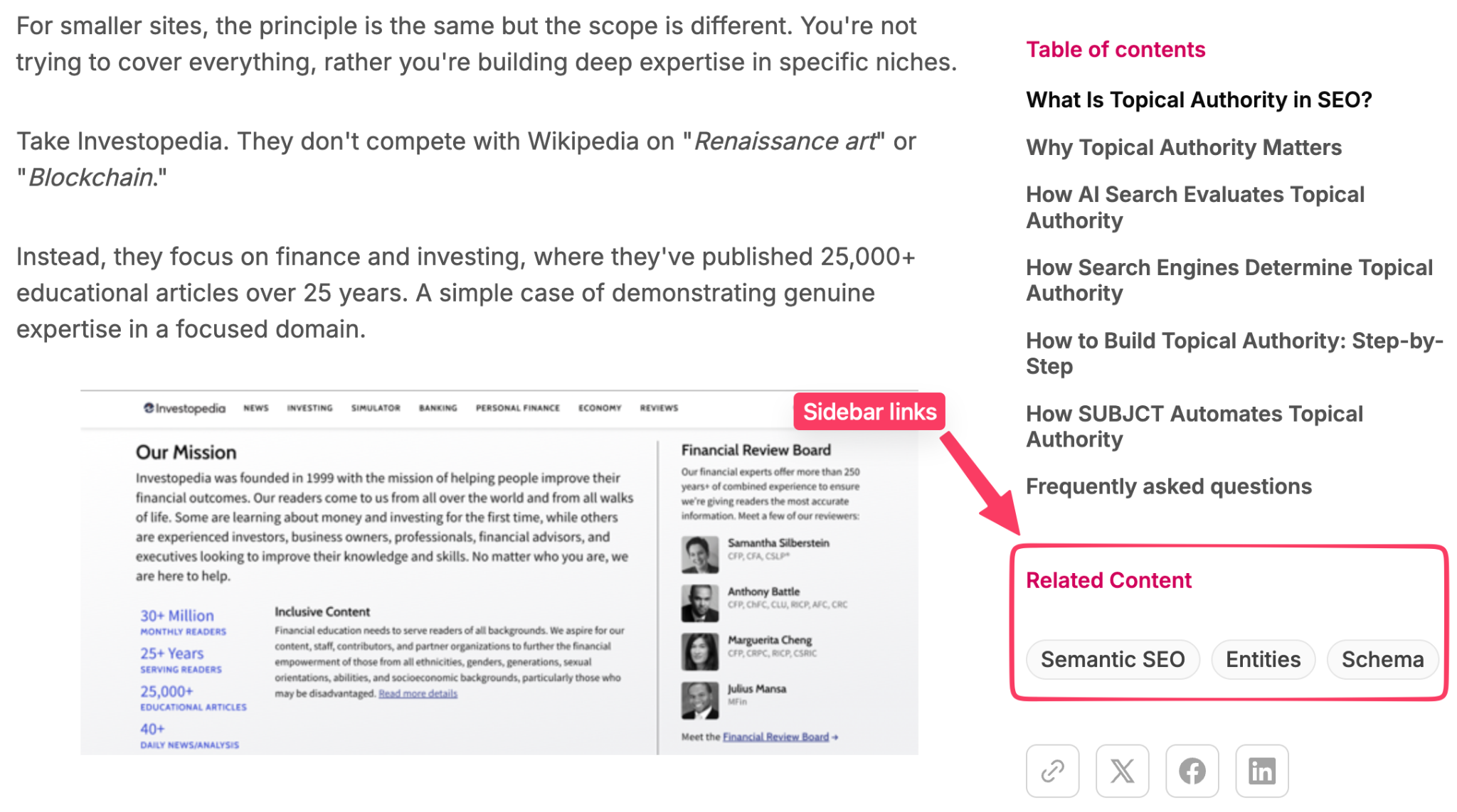
A sidebar that surfaces related articles helps readers go deeper and gives systems another relevance signal.
For the rest of this guide, when we say internal linking, we mostly mean contextual links. Because that’s where the main weight is for both SEO and AI search.
How Internal Links Shape SEO
Internal links do several useful things SEO-wise. Here are 3 known benefits of applying this tactic:
They Help Google Find Your Pages
Google runs a crawler called Googlebot, which discovers content by following links. The image by SEL below is a good way to visualise that.
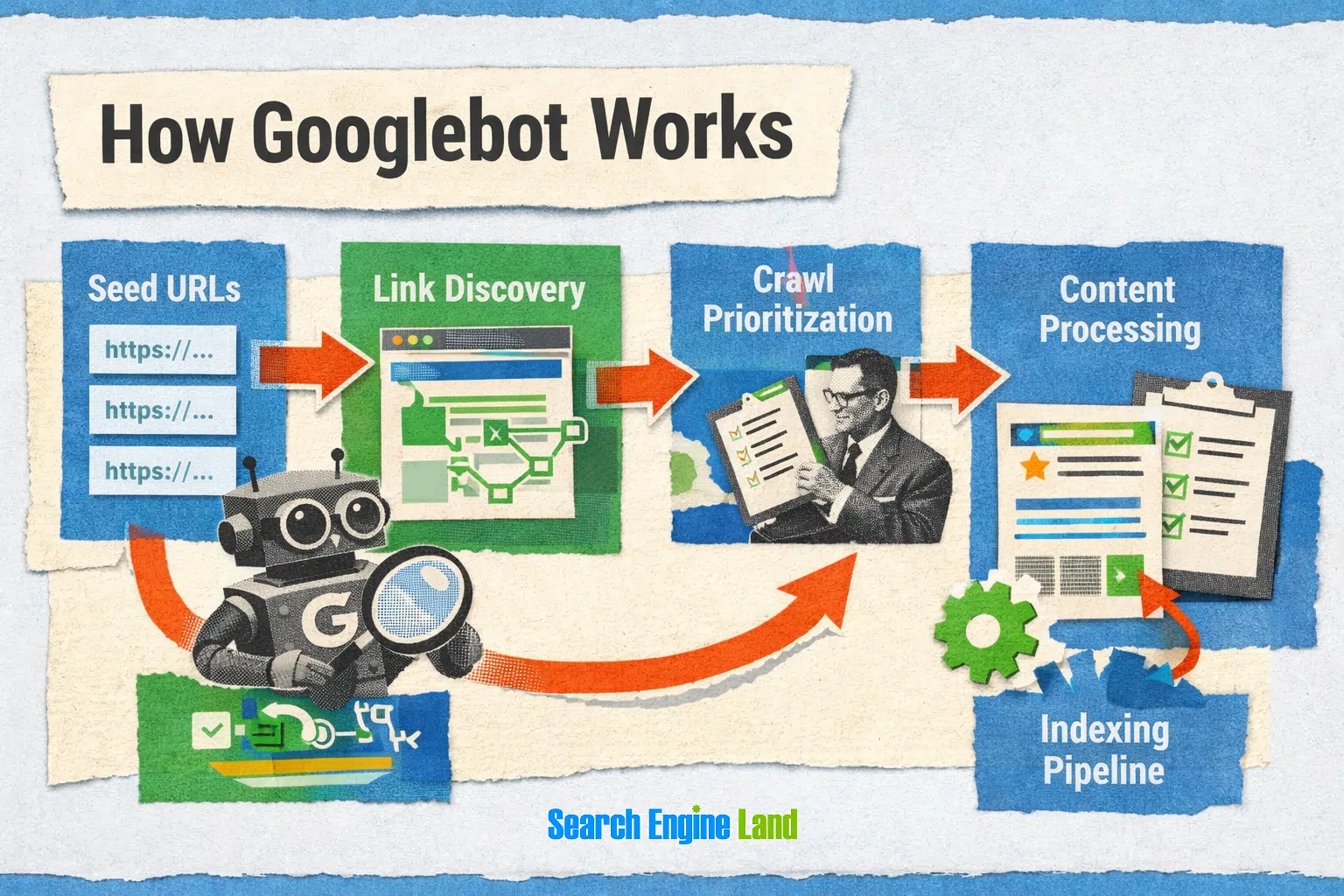
For example, Googlebot might crawl your homepage, follow a link to your blog, move from there to a category page, and eventually reach a newly published article. Every internal link creates another path Google can use to discover pages across your site.
Now picture a page that nothing links to. It sits in your CMS with no menu, index, category, or article pointing to it. If it isn't in your sitemap either, Google may struggle to discover it.
This is what's called an orphan page, and it's one of the most common reasons content sits unindexed. Google's documentation explicitly describes discovery in these terms, noting that pages get found when Google "extracts a link from a known page to a new page" or perhaps when a sitemap (list of pages) is submitted.
They Push Authority to The Pages That Matter
Once a page is found, internal links can also signal which pages on your site are more important.
They pass PageRank (a system for measuring page importance through links), which still forms part of Google’s ranking systems.
The original PageRank patent, filed by Larry Page in 1998, describes a system where links from more important pages carry more weight.
That makes internal linking something you can influence directly. Linking to pages you care about helps Google understand their importance within your site. Google’s search advocate John Mueller once called internal linking "super critical for SEO" and "one of the biggest things you can do on a website to guide Google and visitors to the pages you think are important."
They tell Google what your pages are about
Internal links can also give Google context about the page they point to. A lot of that comes from the anchor text, which is the clickable text used in a link.
Take two links pointing to the same page. One is anchored “click here”, the other “internal linking guide”. Both send a reader to the same place, but only the second gives Google and readers useful context about what they’ll find there. It also helps search engines better understand the page and the topics it may be relevant for.
How Publishers Use Internal Linking
For a publisher, internal linking isn’t just a nice-to-do before or after hitting the publish button; it’s an activity that directly affects revenue.
See it this way: Most publisher revenue comes from ads, and ads depend on pageviews. A reader who lands on one article and leaves generates one pageview. If that same reader clicks into a second article and then a third, they generate three.
That puts more focus on ensuring readers keep moving through the site. The more pages they visit during a session, the higher the impressions and traffic, and ultimately revenue.
Internal linking, done properly, provides one of the clearest opportunities to make that happen by giving readers somewhere useful to go next.
What Internal Linking Does for AI Search
The same links that help readers and search engines move through your site also raise a newer question: do they help your content show up in AI-generated answers?
There is no good evidence yet that internal links are a direct citation signal for ChatGPT, Perplexity, Gemini, or other AI answer engines. But they still matter for a more basic reason. Content has to be discoverable before any system can retrieve or cite it, and internal links help make that possible.
Google makes the connection particularly clear. In its recent guidance on optimising for generative AI, it said existing SEO best practices remain “relevant and foundational” for appearing in AI features such as AI Overviews and AI Mode.
The broader citation research points in the same direction, though with an important caveat: different AI platforms pull from very different parts of the web.
For example, Peec AI analysed 30 million citations across ChatGPT, Google AI Mode, Gemini, Perplexity, and AI Overviews and found clear differences in the sources each platform favoured. Profound, looking at 11.84 billion citations across eight models and 29 industries, found the same thing at a much larger scale.
That matters because it makes the idea of a single “AI ranking factor” much harder to defend. Internal linking is better thought of as part of the site infrastructure that helps important content get discovered, understood, and reached in the first place.
For now, there is no separate internal-linking playbook for AI search. The same work that makes your site easier to crawl, navigate, and understand in traditional search is still the strongest foundation for showing up in AI-generated answers.
Article-to-Article Linking Versus Entity Linking
Most internal linking advice focuses on article-to-article links: connecting related posts to build topic clusters. That’s the kind of linking this guide is mainly about, but there’s another useful type called entity linking.
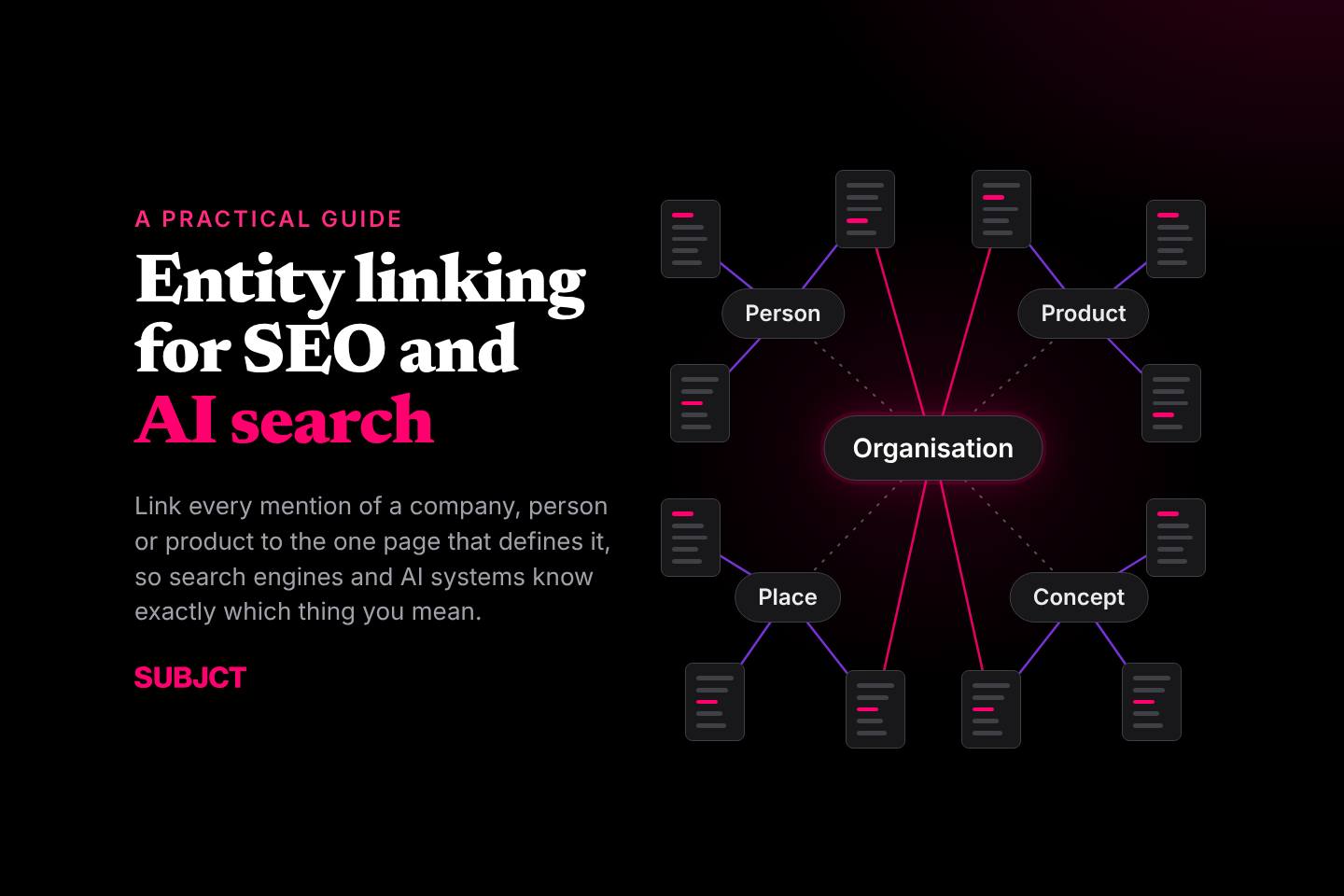
Entity linking connects named things, such as companies, people, products, or frameworks, to a dedicated page about that entity. Say you have a page for IBM. When IBM first appears in an article, you might link that mention back to the IBM page rather than repeatedly linking every mention throughout the piece.
The result is a site that starts to resemble a small knowledge graph. While article-to-article links connect related ideas and build out a topic, entity links connect repeated mentions of the same thing back to a central page that defines it.
Best Practices for Building an Effective Internal Linking Structure
While internal linking is easy to understand, it’s also easy to get wrong. Here are a few best practices to follow:
Build Topic Clusters Around Important Pages
A common approach is to organise content into topic clusters, with a broad pillar or hub page at the centre and narrower supporting articles around it.
For example, a health site might have a broad Diabetes hub linking to pages on symptoms, treatment, diet, blood sugar, and different types of diabetes. Healthline is a great example.
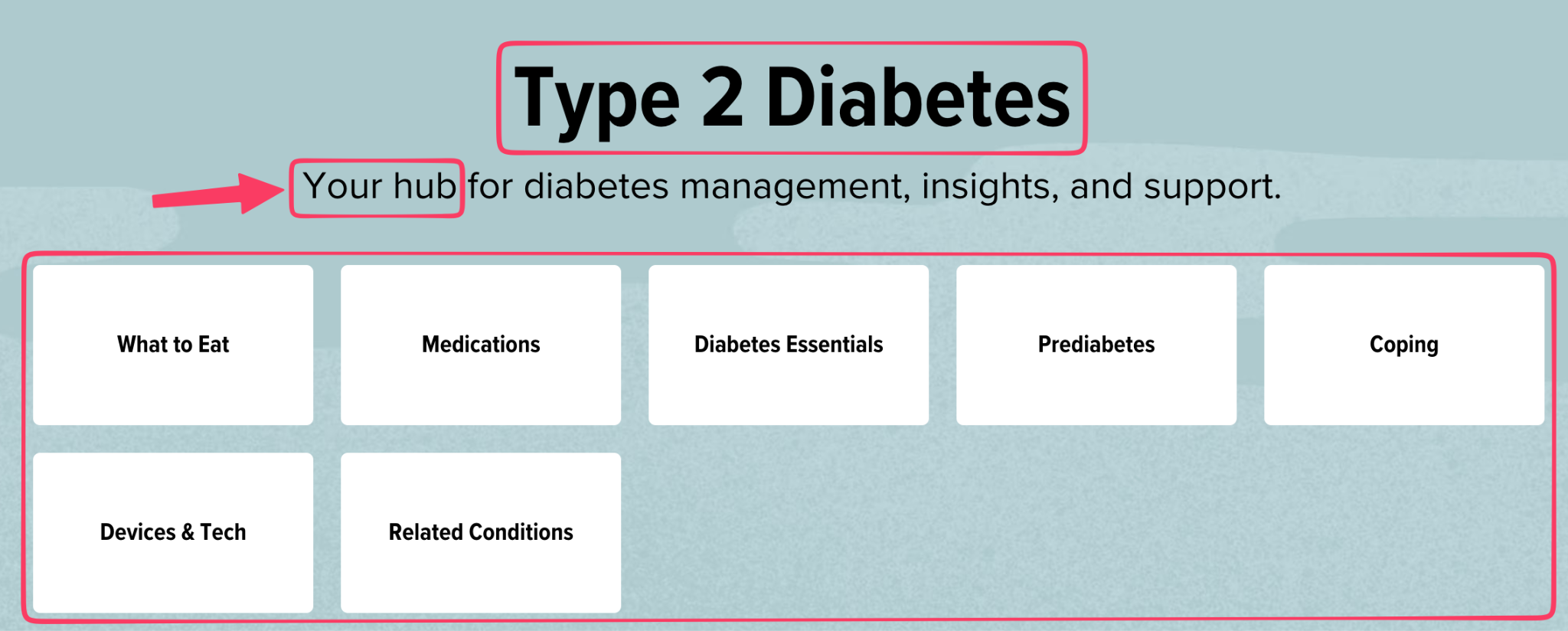
Those supporting pages can also link to each other where the relationship makes sense, creating a structure that reflects how the topic itself is organised.
Use Taxonomies to Organise Related Content
Taxonomies such as categories and tags help group related content and create another layer of internal linking.
Using the same example, Diabetes could sit within a broader Health Conditions category, while tags could group articles around recurring subjects such as insulin, blood glucose, or nutrition.
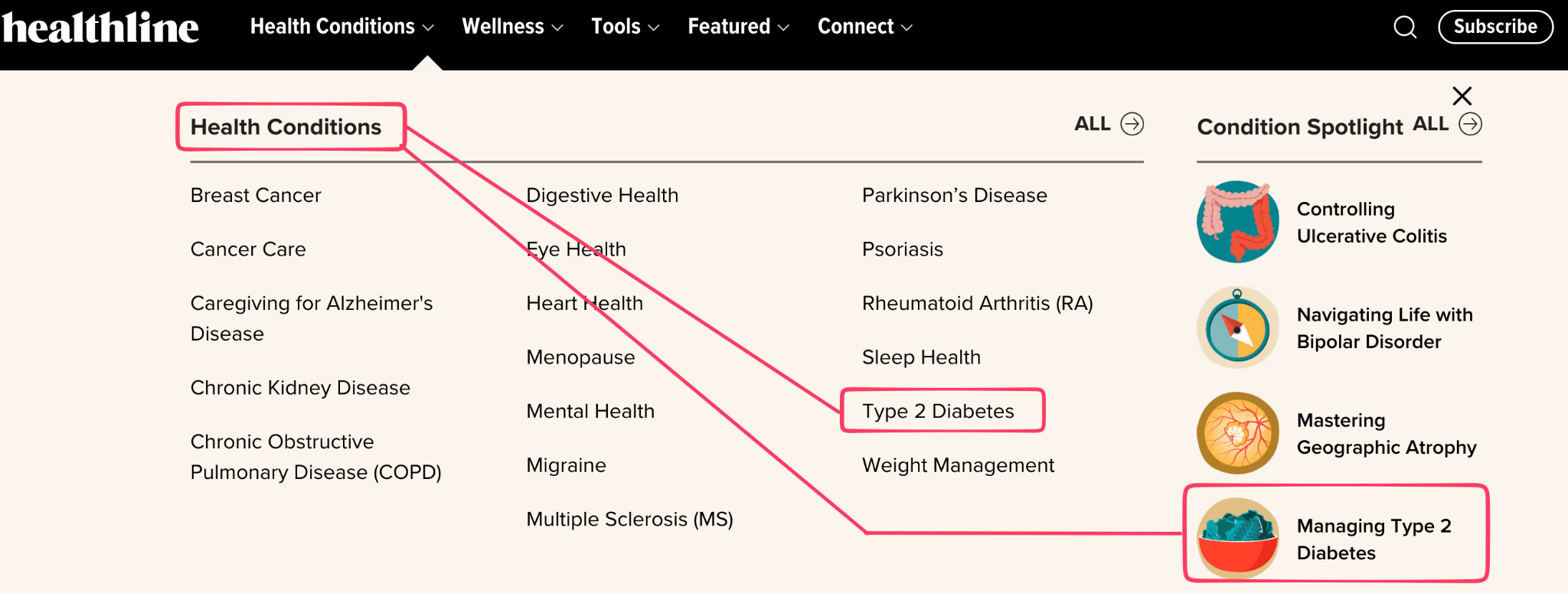
Breadcrumbs reinforce that structure by linking individual pages back through the hierarchy, while pagination helps crawlers and readers move through larger category archives without older content becoming progressively harder to reach.
Push Link Equity Towards the Pages That Matter
Internal links also distribute PageRank, often referred to as link juice or link equity, around a site.
Pages with strong backlinks can pass some of that authority to the pages they link to, which is why important hubs and priority pages should be easy to reach. This also relates to click depth: the deeper an important page sits in the site structure, the harder it can be for users and crawlers to reach it.
Use Descriptive Anchor Text
Anchor text should describe the destination without sounding forced. For example, “diabetes treatment options” tells the reader far more than “this page", but you do not need to force that exact phrase every time.
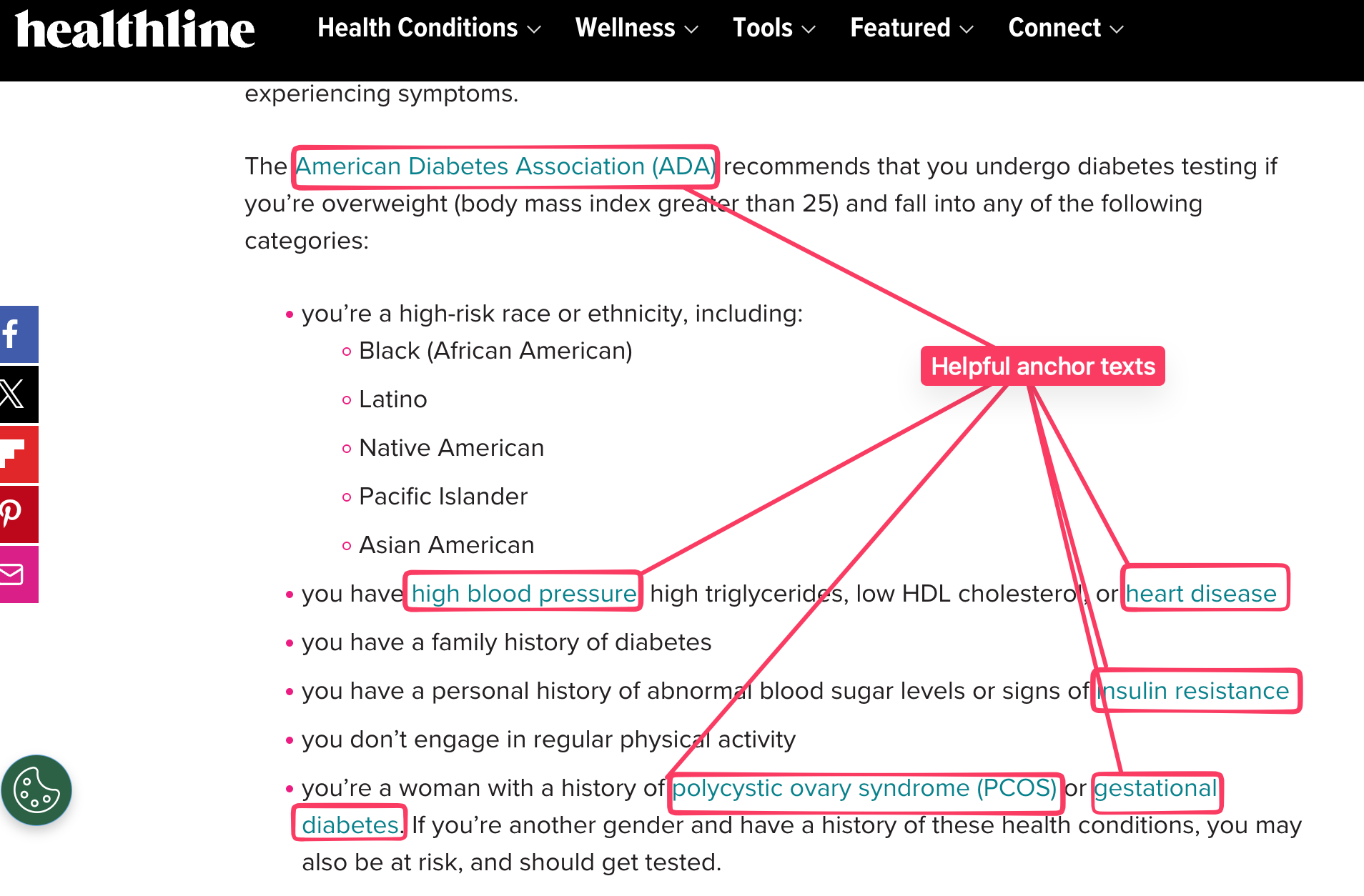
The anchor should describe the destination clearly without making the sentence sound (forcefully) written for a search engine.
How to Audit Your Internal Linking Structure
A good internal linking strategy starts with understanding the link graph you already have. A site crawl can show which pages receive the most internal links, which sit several levels deep, and which have no internal links pointing to them at all.
The main things to look for are:
- Orphan pages: pages with no incoming internal links from the rest of the site.
- High click depth: important pages that take too many steps to reach from the main site structure.
- Broken or redirected links: internal links that lead to errors or unnecessarily pass through another URL first.
- Uneven link distribution: important pages receiving very few links while less useful pages accumulate hundreds.
- Missed linking opportunities: existing articles that mention a subject but do not link to the strongest page covering it.
Tools such as Screaming Frog, Ahrefs, and Semrush can surface most of these issues from a crawl. Ahrefs, for example, also looks for mentions of keywords that a target page already ranks for and uses those to suggest possible source pages for new internal links.
How to Find Internal Linking Opportunities
Once you know which pages need more internal links, the next question is where those links should actually come from.
Say you run a health site and have just published a guide to diabetes treatment. Start by looking through existing articles that already discuss diabetes treatment or closely related subjects such as insulin, blood sugar management, medication, or lifestyle changes. Those are the pages most likely to contain natural opportunities to point readers towards the new guide.
One simple way to find them is with a Google search such as site:example.com "diabetes treatment". This surfaces pages on your site that already mention the topic and gives you a quick list of potential source pages to review. Site crawlers and SEO tools can do the same thing across a much larger archive.
You also don't need to restrict yourself to exact keyword matches. An article about managing blood sugar could contain a passage where a diabetes treatment guide would genuinely help the reader, even if the phrase “diabetes treatment” never appears.
It helps to work in both directions whenever you publish something new. Find older articles that should link to the new page, then check whether the new article should link back to useful existing content. Otherwise, new pages can end up linking into the archive without many older pages linking back to them.
How SUBJCT Automates Internal Linking
All of these best practices are manageable when a site is small. The problem is maintaining them across hundreds or thousands of pages, where every new article creates new linking opportunities across content that may have been published months or years earlier.
SUBJCT automates that process across the archive by:
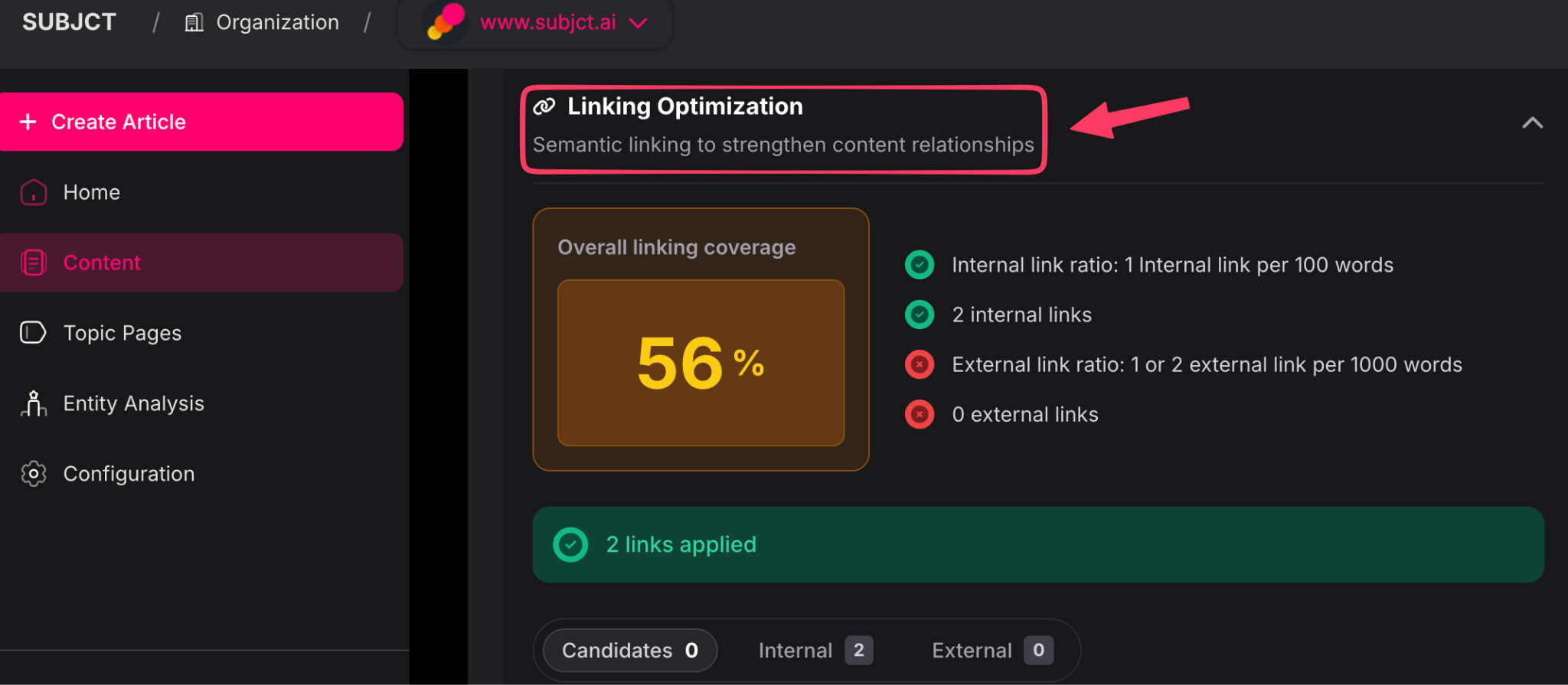
- Finding related content: It breaks articles into contextual passages, creates vector embeddings, and compares them against the rest of the archive to find the closest semantic matches.
- Applying article-to-article links: Those matches become contextual links between related pieces of content, with anchor text generated and links applied directly rather than left as a report for someone to action manually.
- Surfacing candidate links: Relevant matches that need review appear separately in the editor and can be inserted with one click.
- Connecting entities to topic pages: Once topic or tag pages are configured, SUBJCT links the first relevant mention of companies, people, products, places, and other entities back to their corresponding pages.
- Keeping links editable: Every applied link can still be changed, whether that means updating the URL, rewriting the anchor text, or removing the link entirely.
The main advantage is scale. SUBJCT handles the discovery and implementation work that becomes difficult to maintain manually, while teams keep control over what ultimately stays live.
Frequently Asked Questions
Does internal linking help with AI search?
Internal linking can still support AI visibility by helping systems discover and understand the relationships between pages. Google explicitly recommends making important content easy to find through internal links for AI Overviews and AI Mode. For other AI platforms, no study has yet isolated internal linking as a standalone citation factor.
How many internal links should a page have?
Google says there's no ‘magic number’ of internal links, only that if it feels like too many, it probably is. For most articles, 3 to 10 contextual links is a sensible range. Let the count follow how many relevant connections exist, rather than chasing a target.
What anchor text works best for internal links?
Use anchor text that clearly describes the destination. You can also vary the wording when linking to the same page, as long as each anchor accurately describes what the reader will find.
How deep should important pages be from the homepage?
In terms of depth, three clicks or fewer is a good number. Pages buried several levels deep can be harder to discover and receive less internal authority than pages connected more directly to the rest of the site.
How do I find orphan pages on my site?
Crawl your site with tools like Screaming Frog or Sitebulb and filter for pages with no inbound internal links. Comparing what the crawler finds against your XML sitemap surfaces the pages that exist but aren't linked from anywhere.

John Iwuozor
September 29, 2026
Table of contents
Articles in this topic


Ready to build AI search optimisation into your stack?
Get in touch to find out more about our suite of content optimisation products built for AI Search.
.png)